

Top level overview
Instead of running compliance as a single pile of documents tied to a shared drive and its folder structure, OptiTech splits the system into two independent layers: the application layer and the evidence layer. These layers communicate over one contract, with a stream of normalized findings connecting them.
This separation is what makes OptiTech a compliance platform rather than a document archive. Workflows can change, integrations can come and go, and people can reorganize, all without risking the audit trail.
- Application layer: optimized for daily work. This layer runs the Console, the dashboards, the AI copilot, and the API, executing tasks and approvals with your team's context at hand. It never owns evidence; it only produces and reads it.
- Durable evidence layer: optimized for correctness, history, and scrutiny. This layer defines what counts as verified by normalizing findings, links them to controls, and stores long-term, immutable history in an append-only log.
OptiTech's design intentionally keeps the evidence log off the editing path. The log provides durability and auditability, but nothing in the application layer can rewrite it. Day-to-day work stays fast and flexible, while history is handled asynchronously and immutably.
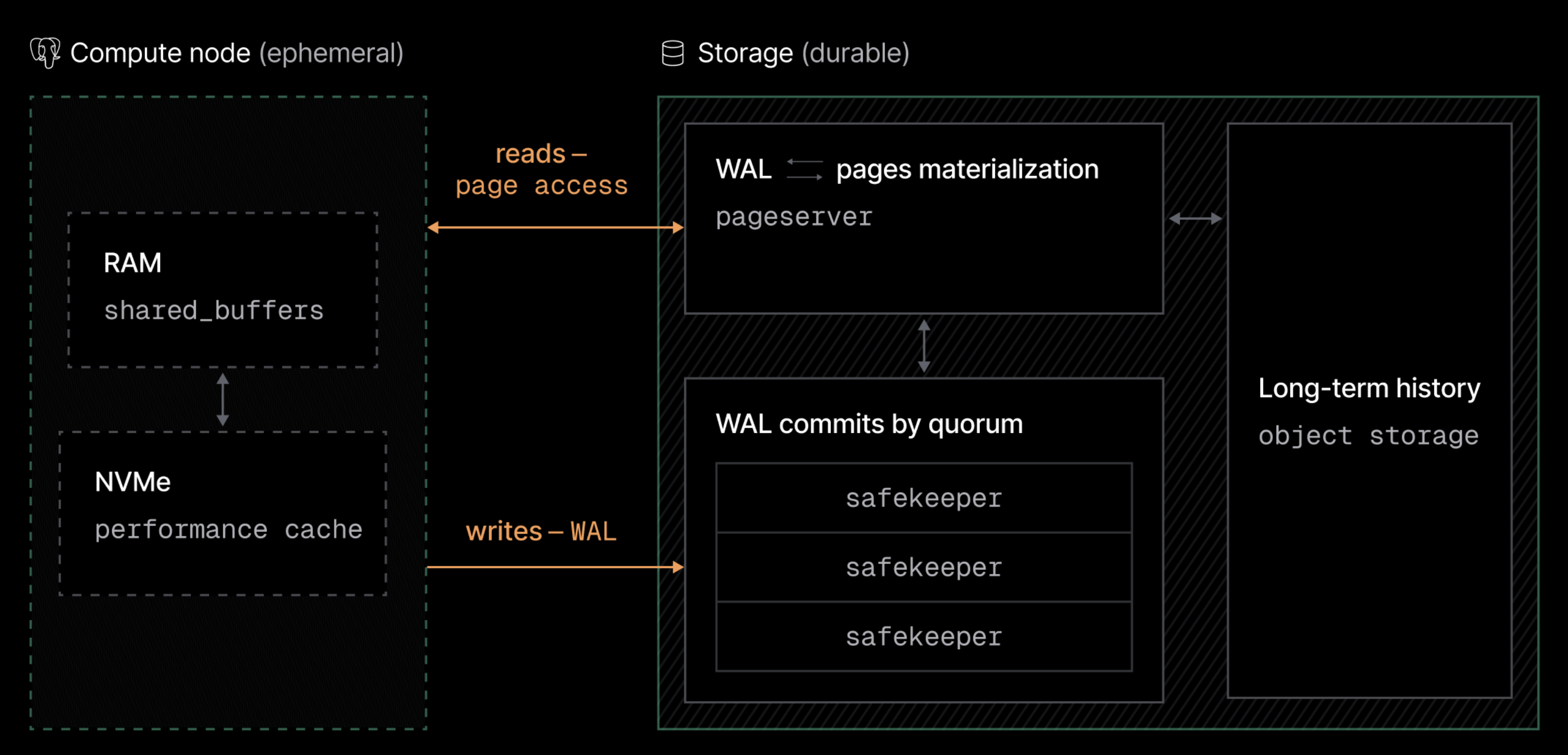
Where does your data live?
The whole platform runs in Swedish and EU data centers under EU ownership, and the AI layer uses EU-hosted models. For the customer-facing summary, see Why OptiTech.
Resource hierarchy
While the sections below describe OptiTech's system architecture, the platform organizes resources into a logical hierarchy:
| Concept | Description | Relationship |
|---|---|---|
| Organization | Highest-level container for billing, users, and frameworks | Contains Frameworks |
| Framework | A regulation or standard you activate (NIS2, DORA, ISO 27001) | Contains Requirements |
| Requirement | A single obligation from the source text, in plain language | Maps to Controls |
| Control | A verifiable measure that satisfies one or more requirements | Verified by Evidence |
| Evidence | A finding with source and timestamp, appended to the log | Belongs to Controls |
| Task | Manual work an integration can't verify, with an owner and deadline | Linked to a Control |
| Owner | The person alerted when a control drifts or a task is due | Assigned per Control or Task |
Requirements and controls are many-to-many: that's the cross-mapping that lets one control count in several frameworks. For details on each concept, see the glossary.
Application layer
The application layer is where your team actually works. It runs the Console, the dashboards, the document workflows, the copilot, and the API. From the perspective of your daily tasks, nothing about how you work is rewritten or replaced.
What is different in OptiTech is what the application layer is responsible for. It exists to produce and read evidence, not to preserve it. A workflow can change, a user can leave, or a report can be regenerated at any time without putting the audit trail at risk.
Components
The application layer has access to fast, contextual resources:
- Your organization's live control status, for dashboards and alerts
- The copilot's retrieval index over legal texts and your own data
Status queries stay snappy because they read materialized state, not the raw log.
How the application layer fits into the system
When you complete a task or approve a document, the layer behaves as you would expect:
- The action is validated against your role
- The change is applied to the working state
- The dashboards update
The OptiTech difference appears when the system crosses the boundary between work and proof. Instead of editing records in place, every consequential action emits an event to the evidence layer. An action counts as recorded once the log has appended it. The application layer does not wait for exports, reports, or reviews.
For reads, the application layer always prefers materialized state. Dashboards read current status directly. Only when someone needs history (an auditor, an incident review, a board report) does the system replay from the log, reconstructing exactly what was true at any point in time.
Evidence layer
If the application layer is responsible for work, the evidence layer is responsible for correctness, durability, and history. This layer exists independently of any workflow and continues to operate even as your team and tools change.
Rather than exposing an editable database, the evidence layer is built around three distinct components, each with a well-defined role:
- Integration workers: collect raw findings from your systems
- The normalization engine: turns findings into control evidence
- The append-only log: holds long-term, immutable history
Integration workers: collecting findings per source
Integration workers are responsible for one thing: reliable collection of findings. Each connected system (Entra ID, AWS, GitHub, Fortnox) has its own worker that checks controls on a schedule. A finding is considered collected once the worker has captured it with its source and timestamp.
This is a fundamental difference from how manual compliance works:
- Verification in OptiTech is enforced through scheduled checks, not annual sampling
- Collection latency is source-bound, with workers batching checks rather than waiting for audit season
- No single person defines the verified state of the program
Normalization engine: findings ⇄ evidence
The normalization engine sits between raw findings and control evidence. Its job is to materialize evidence by combining findings with the control and requirement mappings. It is the system's translation layer between what your systems report and what your frameworks require.
When a control needs its status at a specific point in time, the engine checks whether that state is already materialized. If not, it reconstructs it by replaying the log up to the requested moment and returns the result. Materialized states are kept current asynchronously, building up the queryable history of the program.
Importantly, normalization is not on the action's critical path. Completing a task never waits for reports to rebuild.
The append-only log: long-term, immutable history
The log is where OptiTech keeps the durable history of your program. This layer stores every finding, approval, and change as hash-chained entries, immutable representations of past states. It is not a working surface, and it is never edited by the application layer. It backs the audit trail, not the dashboard.
This distinction is critical for trust. The log is optimal for integrity, scrutiny, and history, not editing. Replaying deep history may take a moment, but in OptiTech, that happens only when someone asks for the past, and never during daily work.
Write path: recording an action in OptiTech
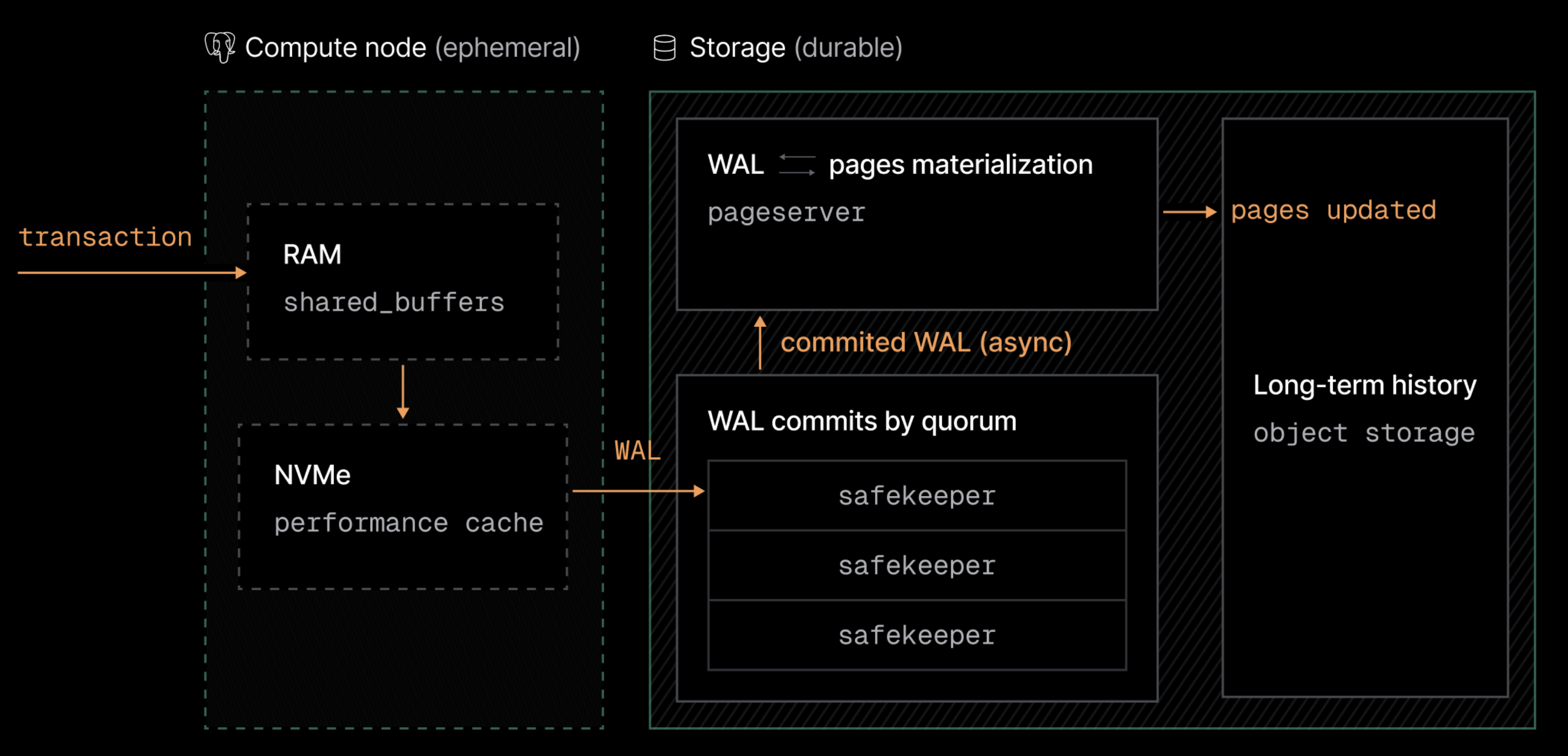
When an action happens in your program:
- The application layer applies the change. A task closes, a document is approved, or a check completes, and an event is generated as usual.
- The event is streamed to the log. Instead of editing history in place, the layer sends the event with its actor, source, and timestamp.
- Recorded is defined by the chain. An action counts as recorded once the log has appended it and linked its hash to the previous entry. At this point, the audit trail includes it permanently.
- Status materialization happens later. Dashboard updates and report rebuilds happen asynchronously in the evidence layer.
Read path: serving audits without assembly projects
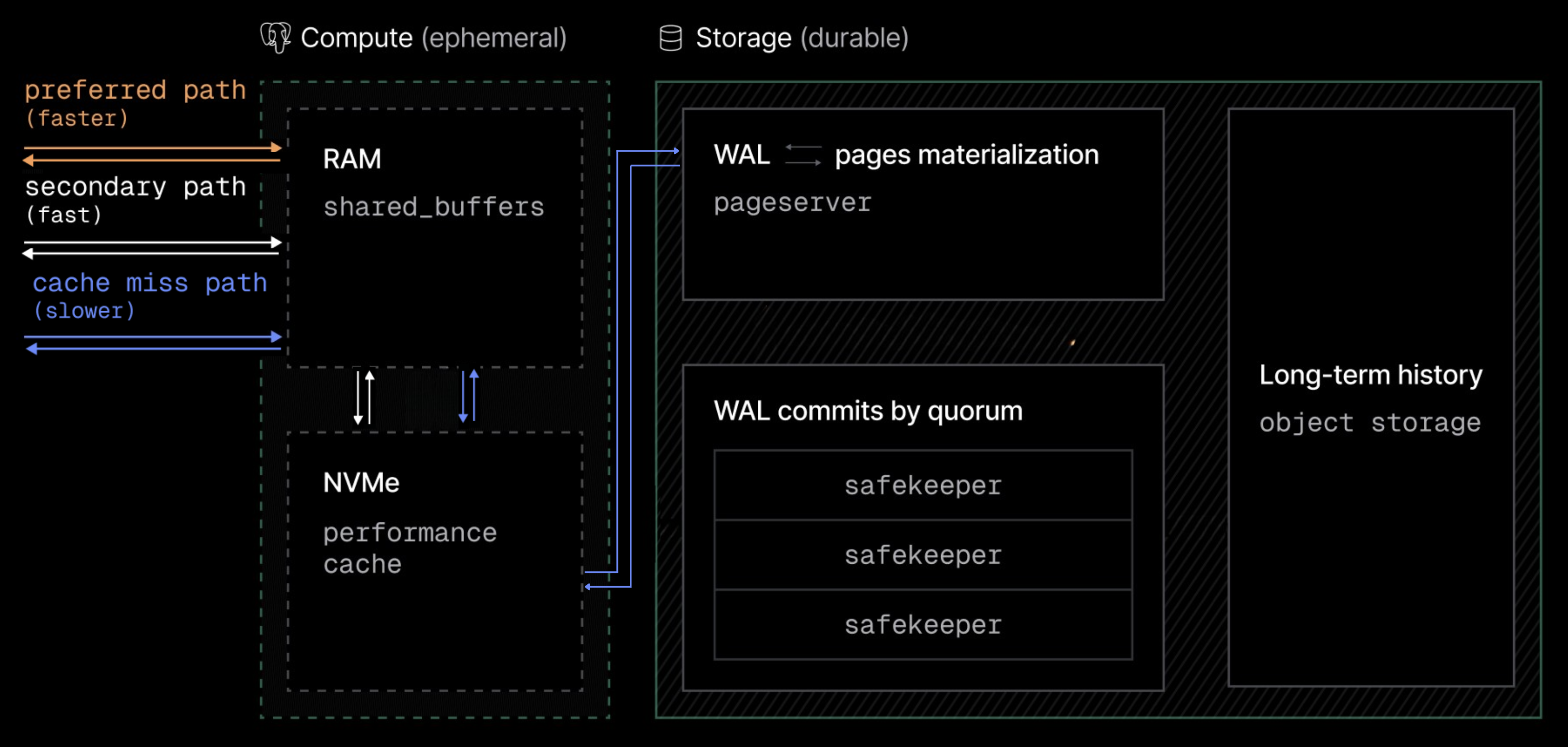
The obvious concern with an append-only log is speed, but OptiTech's architecture is designed specifically to avoid this. The most important thing to understand about reads in OptiTech is this: daily work does not read from the raw log. The log backs the system, but it is never on the hot path.
The preferred path: status first
When someone needs to know where the program stands, the system follows a preference order:
- Live status. Dashboards, alerts, and the copilot read materialized state, the fastest path.
- Recent history. Trends and period reports read pre-built summaries. Access here is still fast.
Only if someone needs a precise historical state does the system involve the log (next section).
Deep history: replaying the chain
On a historical request, the evidence layer replays the log up to the requested point in time. The engine then:
- Checks whether that state is already materialized
- If not, reconstructs it from the chain and returns exactly what was true then, with every entry's hash verifiable
Once returned, the state can be cached, making subsequent audit queries fast. This reconstruction only happens if needed, and only for the periods actually examined.
Integrity
Integrity in OptiTech is not a single mechanism but a composition of responsibilities. No single component is responsible for everything, and no single person defines the state of the program.
This layering is what allows OptiTech to tolerate failures intrinsically:
- If an integration breaks → checks pause, but history is safe. The affected controls flag as unverified until collection resumes.
- If a report is wrong → no history is lost. Reports are projections and can be rebuilt from the log at any time.
- If a person leaves → their actions remain attributed and the audit trail is unaffected. Ownership reassigns without rewriting history.
- The hash chain is the last line of defense → it makes silent edits detectable and survives everything above it.
What this architecture enables
This design turns traditionally heavy-weight compliance operations (which usually require assembling documents by hand) into simple queries over existing history. These include producing a board report, opening an auditor portal, answering a questionnaire, or reconstructing an incident timeline. In OptiTech, these operations are fast because they operate on references to existing history, not on documents someone has to gather.
- Continuous verification. Because evidence collection lives outside any workflow, controls stay verified between audits, with drift alerts and auto-remediation when something changes.
- Cross-framework mapping. When you activate a new framework, OptiTech does not duplicate your work. Instead, the new framework points to your existing controls and diverges only where its requirements genuinely differ. Only the true gap consumes additional effort.
- Instant audit access. Because the program's history is preserved as immutable entries, giving an auditor access does not involve assembling a binder. The portal reads the same chain, scoped and read-only, even for years of history.
- A unified foundation for compliance and reporting. Once evidence lives in one log, it is no longer isolated per framework. The same underlying history that answers an ISO auditor also answers a DORA supervisor, a customer questionnaire, and your own board.
In short
OptiTech is a compliance platform that treats:
- workflows as ephemeral and replaceable;
- evidence as durable, normalized, and shared;
- the append-only log as the source of truth;
- and the hash chain as the foundation.
The result is a compliance architecture that scales, recovers, and evolves without being constrained by any one person's spreadsheet or memory. For your team, this means faster audits, safer changes, and a program that adapts automatically as your business grows from first framework to full supply-chain coverage.