

Managing your OptiTech environment requires an understanding of the OptiTech object hierarchy. At the top level, an Organization contains one or more Projects. Each Project contains Branches, which in turn contain Computes, Roles, and Databases. The diagram below illustrates this hierarchy.
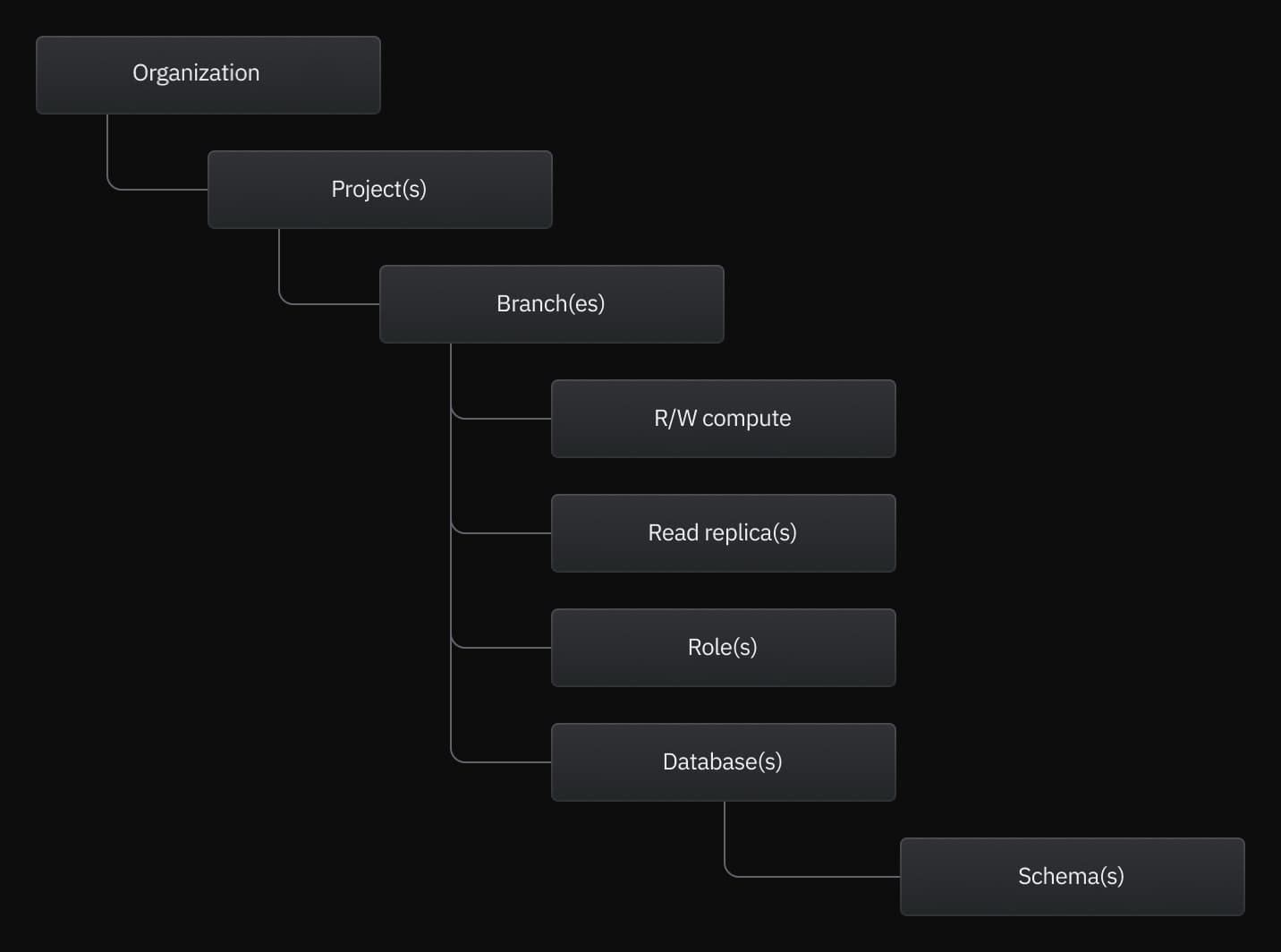
OptiTech account
Your OptiTech account represents your user profile and is used for authentication, personal settings, and managing personal API keys. You can sign up for a OptiTech account with an email, GitHub, Google, or partner account. A single OptiTech account can belong to multiple organizations.
API keys can be personal (global to your account) or scoped to an organization or project. For more details, see Manage API keys.
Organizations
Organizations are the top-level containers for projects and resources in OptiTech. They allow you to organize and manage a team's projects under a single OptiTech account, with billing, role management, and project transfer capabilities all in one accessible location in the OptiTech Console.
Projects
A project is a container for all objects except for API keys, which are global and work with any project owned by your OptiTech account. Branches, computes, roles, and databases belong to a project. A OptiTech project also defines the region where project resources reside. A OptiTech account can have multiple projects, but plan limits define the number of projects per OptiTech account. For more information, see Manage projects.
Default branch
Data resides in a branch. Each OptiTech project is created with a default branch (named production in the Console, main via API/CLI). This initial branch is also your project's root branch, which cannot be deleted. After creating more branches, you can designate a different branch as your default branch, but your root branch cannot be deleted. You can create child branches from any branch in your project. Each branch can contain multiple databases and roles. Plan limits define the number of branches you can create in a project and the amount of data per branch. To learn more, see Manage branches.
R/W computes and Read Replicas
A compute is a virtualized computing resource that includes memory for running applications. In the context of OptiTech, a compute runs Postgres. When you create a project in OptiTech, a primary R/W (read/write) compute is created for a project's default branch. OptiTech supports both R/W and Read Replica computes. A branch can have a single primary R/W compute but supports multiple Read Replica computes. To connect to a database that resides on a branch, you must connect via a R/W or Read Replica compute associated with the branch. Your OptiTech plan defines the compute resources available to your R/W and Read Replica computes. For more information, see Manage computes. Compute size, autoscaling, and scale to zero are all settings that are configured for R/W and Read Replica computes.
Roles
In OptiTech, roles are Postgres roles. A role is required to create and access a database. A role belongs to a branch. There is a limit of 500 roles per branch. The default branch of a OptiTech project is created with a role named for your database. For example, if your database is named optitechdb, the project is created with a role named optitechdb_owner. This role is the owner of the database. Any role created via the OptiTech Console, CLI, or API is created with optitech_superuser privileges. For more information, see Manage roles.
Databases
As with any standalone instance of Postgres, a database is a container for SQL objects such as schemas, tables, views, functions, and indexes. In OptiTech, a database belongs to a branch. If you do not specify your own database name when creating a project, the default branch of your project is created with a ready-to-use database named optitechdb. There is a limit of 500 databases per branch. For more information, see Manage databases.
Schemas
All databases in OptiTech are created with a public schema, which is the default behavior for any standard PostgreSQL instance. SQL objects are created in the public schema, by default. For more information about the public schema, refer to The Public schema, in the PostgreSQL documentation.